Dev Diary: Building "WhereAreYou?"
When you're starting a small project, it's tempting to reach for the latest and greatest tech. But I decided to stick with a simple, robust stack that I knew would get the job done without a lot of ceremony.
- Backend: Python and Flask. Flask is my go-to for small projects. It's lightweight, unopinionated, and lets you get a web server up and running in minutes. For this project, all I needed was a single API endpoint, so bringing in something like Django would have been like using a sledgehammer to crack a nut.
- Frontend: Good ol' Vanilla JavaScript, HTML, and CSS. No React, no Vue, no Angular. The game's logic is fairly straightforward, and I wanted to avoid the overhead of a big framework. This decision forced me to be clean with my DOM manipulation and state management, which was a great exercise.
- The Star Player: The Google Maps JavaScript API. This is what makes the whole
thing possible. I specifically used the
StreetViewPanoramaservice, theMapsservice for the guess map, and a crucial helper, theStreetView Image MetadataAPI. - Deployment: Docker and Gunicorn. Even for a small project, I think it's crucial
to plan for deployment from the start. Using Docker means my development environment is
identical to my production environment. Gunicorn is a battle-tested WSGI server for Python, a
massive step up from Flask's built-in development server. The
Dockerfileis simple: start with a Python image, install dependencies fromrequirements.txt, copy the code, and fire up Gunicorn.
System Design: The Core Loop
At its heart, the application is a conversation between the client (the browser) and the server.
Here’s the high-level flow:
- Settings: The user first lands on an
intro.htmlpage to choose their game settings. This is a simple HTML form. - Game Start: When the user hits "Start," the browser navigates to the main game
page,
index.html, passing the settings as URL parameters (e.g.,?countdownToggle=on&timer=30). - The API Call: As soon as the game page loads, the frontend JavaScript
(
game.js) makes afetchrequest to my one and only backend endpoint:/api/random-location. - The Backend's Magic Trick: This is where the core challenge of the entire app lies. The backend's job is to find a random spot on Earth that actually has Google Street View data.
- Rendering the Game: The backend responds with the latitude and longitude. The
frontend then uses this to initialize the
StreetViewPanoramaand the guessing map.
The Biggest Challenge: "Just Find a Random Place"
This sounds so easy, but it was the hardest part of the project. My first naive thought was: just generate a random latitude and longitude and feed it to Street View. I quickly discovered that this usually lands you in the middle of an ocean, a desert, or a forest with no Street View coverage.
The solution was to use the Street View Image Metadata API. This endpoint acts as a check. You give it coordinates, and it tells you if a panorama exists nearby.
My backend logic for /api/random-location ended up looking like this, in a
while True loop:
- Generate a random
latbetween -90 and 90 andlngbetween -180 and 180. - Make a GET request to the
streetview/metadataendpoint with these coordinates. - Crucially, I added a
radiusof 100,000 meters. This tells the API, "Look for a panorama within 100km of this random point." This dramatically increases the chances of finding something. - I also added
source: 'outdoor'to prioritize outdoor shots, which is what you want for a GeoGuessr game. - The API response has a
statusfield. Ifstatusis'OK', it means a panorama was found. I break the loop and send the coordinates from the metadata (which are the actual panorama coordinates, not my random guess) back to the client. - If the status is
ZERO_RESULTSor there's an error, the loop continues, and it tries again with a new random point.
It feels a bit like brute force, and it is! But for a simple app, it's surprisingly effective. The
try...except block is important to catch network errors so the server doesn't crash if
the Google API call fails.
On the Frontend: Taming Asynchronicity and Making it Fun
The Game Loop in game.js
- Modern API Loading: I'm using the new
async/awaitsyntax withgoogle.maps.importLibrary("maps"). This is way cleaner than the old callback-based approach and makes the initialization code much easier to read. - State Management: I kept it simple with a few global variables:
map,panorama,latLngfor the correct answer, andguessMarker. No need for a complex state machine here. - The Guess: When the user clicks the "Guess" button, the
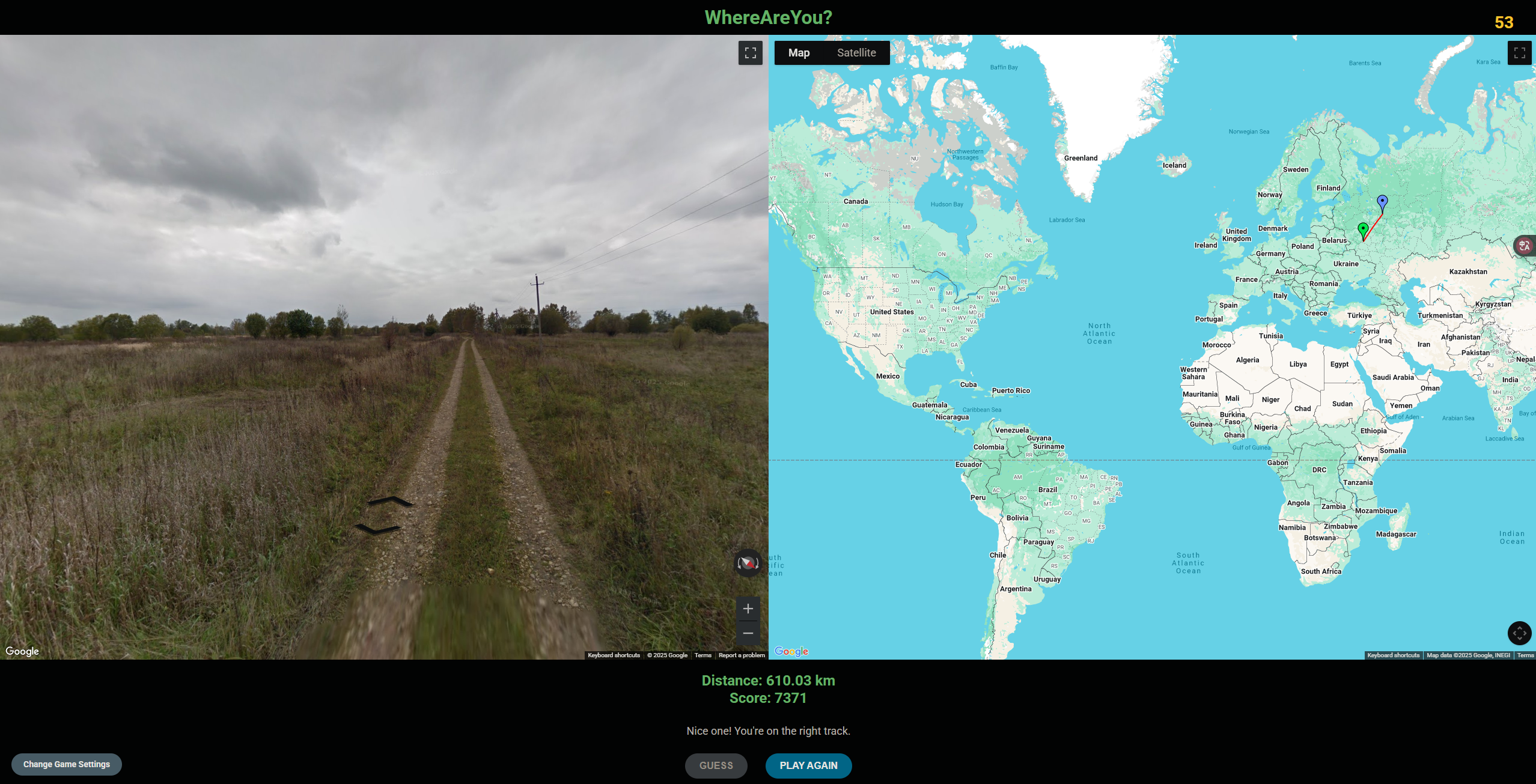
makeGuessfunction kicks in. This is where the payoff happens.- Calculating Distance: The Maps API has a
geometrylibrary that does the heavy lifting.spherical.computeDistanceBetween(actualLatLng, guessLatLng)calculates the great-circle distance between the two points in meters. - The Scoring Algorithm: A linear score felt boring. Getting within 1km
should be worth way more than getting within 2000km. I settled on an exponential decay
function:
score = 10000 * Math.exp(-distance / 2000000). This gives a perfect 10,000 for very close guesses and drops off quickly, which feels more rewarding. - Visual Feedback: This is key to making it feel like a game.
- I draw a red
Polylinebetween the guess and the actual answer. - I drop a new green marker on the actual location.
- I use the map's
fitBoundsmethod to automatically zoom and pan so both the guess and the answer are perfectly in view. This is a small touch that makes a huge difference to the user experience.
- I draw a red
- Calculating Distance: The Maps API has a
Final Thoughts and Learnings
This project was a great reminder that you don't need a mountain of frameworks to build something cool.
- Learning 1: The power of utility APIs. The Street View Metadata API was the unsung hero of this project. Sometimes the key to solving a problem is finding that one small, simple tool that does exactly what you need.
- Learning 2: Plan for production. Writing a
Dockerfilefrom day one made the (eventual) deployment process a non-event. Gunicorn is a must for any real Flask app. - Learning 3: UX is in the details. Things like disabling buttons when they can't be used, providing fun feedback messages based on the score, and automatically adjusting the map view are what elevate a project from a technical demo to a fun user experience.
It was a blast to build, and it's a great little game to challenge friends with. Now, if you'll excuse me, I have a new idea for a feature... maybe a multiplayer mode?